
A customer emailed you yesterday. You never saw it. It landed in your spam folder, sat there for a few weeks, and then disappeared forever. They moved on. You lost the sale. You picked your email platform for good reasons — reliability, cost, features. The spam filter was part of the deal. Spam filters protect the whole internet. They do not know your business. You need a tool you can train to recognize your clients.
This problem is not new for us. Since 1999, a missed customer email has meant a missed opportunity — and we felt every one of them. For the past fifteen years, I personally opened five or six mailboxes every morning to scan the spam folders. Four or five rescued emails a week. Web-based mail is painfully slow for this — every login triggers ads, 2FA prompts, and loading delays. Six mailboxes in five minutes is a grind. Adding all six to Outlook or Thunderbird just bloats Send/Receive with inboxes, sent folders, and archives you do not need. No existing tool focused on just the spam folder, across multiple accounts. So we built one.
Your Spam Folder Is Eating Your Business Leads
Most businesses check their spam folder when something feels wrong. A prospect mentions they emailed twice. A deal goes quiet. By then the email is already gone — most providers auto-delete spam after 30 days. Checking occasionally is not a strategy. It is a gap.
The problem multiplies with every email address you run. Sales, support, billing, info — each one has its own spam folder, and each one is a place where a customer’s email can vanish unnoticed. Manual daily review across all of them is a job nobody volunteers for. So it slides. The cost stays invisible — you cannot mourn an email you never knew existed.
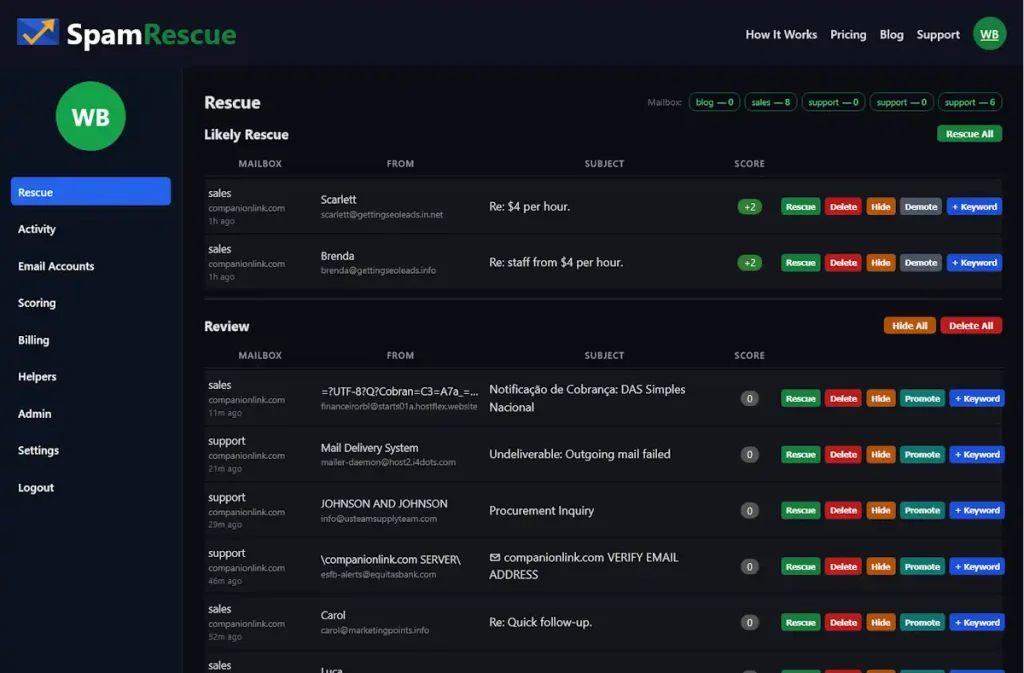
[Screenshot: SpamRescue Rescue dashboard showing multiple mailboxes and Likely Rescue queue]
One Tool. Three Ways to Use It.
SpamRescue scales to your situation. A freelancer running one inbox has different needs than a small business with four addresses — or an office manager responsible for ten executive mailboxes. The tool fits all three. Here is how.
Use Case 1: The Solo Owner
One inbox. Busy all day. Your spam folder gets checked once or twice a week. SpamRescue connects to your mailbox and runs automatic scans. Every message gets a score. Likely client emails surface at the top. A sixty-second review replaces a twenty-minute dig through junk.
The free plan covers one mailbox. No credit card required. You will find something waiting in there. Everyone does.
Use Case 2: The Small Business With Multiple Addresses
Sales, support, info — three or four addresses minimum. Each one a potential blind spot. SpamRescue connects them all and scans twice daily. One consolidated queue. Every message scored and sorted. One decision per email: rescue, delete, or hide.
The Starter plan is $19/month for three mailboxes. One screen. Done in minutes.
Use Case 3: The Team Manager or IT Lead
Ten mailboxes. Executives who will not check their own spam. A support queue that nobody is watching. SpamRescue’s Professional plan includes Helper Accounts — assign one staff member to monitor spam across all accounts. They see subject lines and senders. They never see the inbox, sent folder, or any credentials. Accountability without exposure.
Ten mailboxes, four scans daily, ninety days of history. At $49/month, one recovered customer covers the cost.
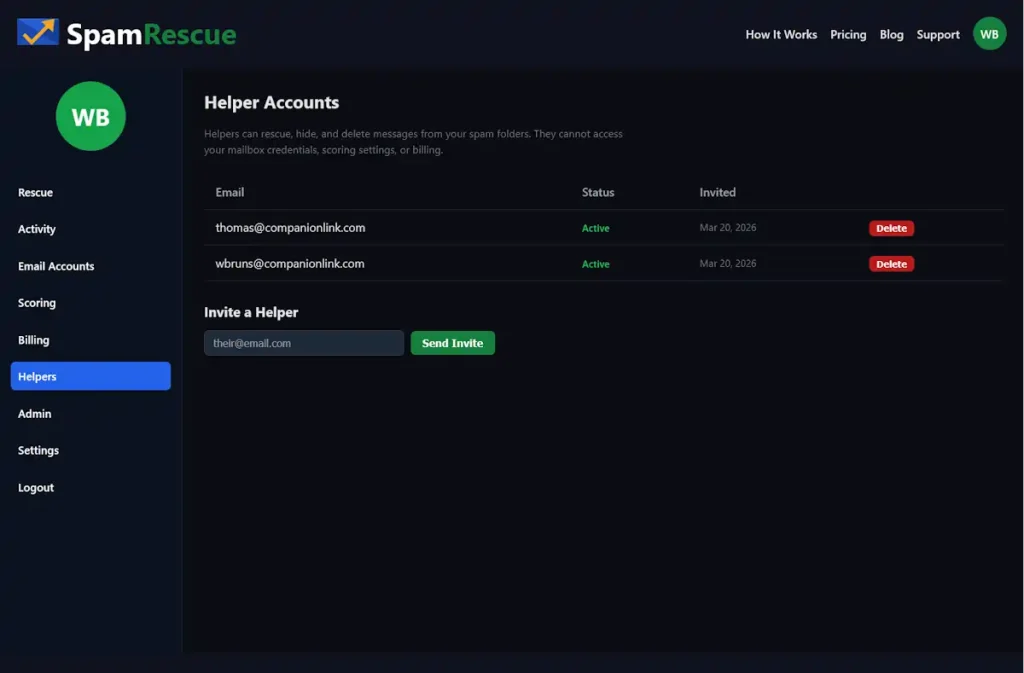
[Screenshot: Helper Accounts screen showing invited team members]
Frequently Asked Questions
How do I move a client email from spam to my inbox?
Find the email in your spam folder. Select it and click “Not Spam” or “Mark as Legitimate.” Your email client moves it to the inbox. Safelisting the sender prevents the same problem next time. The challenge is doing this reliably, every day, across every mailbox you own — before the 30-day delete window closes.
Why are my client emails landing in spam?
Spam filters score on signals — sender domain age, IP reputation, email formatting, specific words in the subject or body. A legitimate client can fail those tests for reasons outside your control. New domains score poorly. Shared hosting flags entire IP ranges. Certain common business words trigger filters. The filter has no idea that sender is your best customer.
How often should I check my spam folder?
Every day. Email providers auto-delete spam after 30 days in most configurations. A client who emailed three weeks ago and heard nothing has already moved on. Daily monitoring — ideally in the morning — is the minimum. Automated scanning removes the burden entirely.
Can a staff member check spam without seeing the full inbox?
Not with standard email clients. Sharing credentials means sharing everything — inbox, sent folder, drafts, the works. The practical workaround is a dedicated monitoring account with limited scope. Some purpose-built tools handle this with role-based access, keeping spam monitoring separate from full mailbox exposure.
Will monitoring spam reduce the amount I receive?
No. The volume of global spam increases every year. Monitoring your spam folder does not slow the inflow. The goal is not to stop spam — it is to make sure real emails do not get buried inside it.
Is AI a good solution for spam folder management?
Unlikely. Your spam filter is already making automated judgments on every incoming message. Layering AI on top adds a second broad system second-guessing the first. What works better is a scoring system you control — one you can train with your own keywords, trusted senders, and business-specific rules. Specific beats general, every time. AI tools also raise data security questions worth considering before granting mailbox access.
How do I automatically surface client emails from spam?
Most email platforms support filter rules — whitelist a domain or sender so their messages bypass the spam folder entirely. The problem is you have to know who to whitelist before they contact you. For first-time client inquiries, regular manual review combined with sender trust rules built over time is the most reliable approach.
Stop Letting Your Spam Folder Cost You Customers
The rule is simple. A customer emails you, you reply. That only works if the email reaches you. Right now, across your mailboxes, some number of customer emails are sitting in spam folders you are not checking closely enough. You do not know which ones. You do not know how many.
SpamRescue connects to your mailboxes, scans your spam folders on a schedule, and puts likely client emails in front of you — one clean list, one quick decision. Nothing falls through. Try SpamRescue free — one mailbox, no credit card.
Summary
What does a missed email actually cost? A lost sale? A one-star review from a customer who felt ignored? One unanswered inquiry can cost more than a full year of any spam monitoring service. And yet — who has the patience to log into six mailboxes every morning and scroll through hundreds of atrocious subject lines looking for the two real ones?
SpamRescue is a focused tool that saves you time, protects your reputation, and makes sure your customers get a reply. Start free at SpamRescue.com.
